|
|
|
| |
Update on Meaningful Use!
On July 28, the Department of Health and Human Services (HHS) published in
the Federal Register the final rules for meaningful use and certification
standards of electronic health record (EHR) systems under the
HITECH
provisions of the American Recovery and Reinvestment Act (ARRA). The rules
establish the requirements for eligible hospitals and providers to
qualify for Medicare and Medicaid incentives for meaningful use of
certified EHRs. For a summary of the regulations, you may want to read
The
New England Journal of Medicine article by David Blumenthal, M.D.,
M.P.P., and Marilyn Tavenner, R.N., M.H.A.
|
|
|
|
|
|
|
|
|
| |

The Office Hours Professional add-on module makes the front desk even more
efficient, enabling staff to:
- Use a color-coded appointment template to reserve time slots for
certain types of appointments.
- Track the status of appointments and mark them as unconfirmed,
confirmed, checked in, being seen, checked out, missed or cancelled.
- Display appointments based on office preference, such as: by day,
week or month; by provider; or by equipment or treatment room.
- Print patient-specific Superbill for all appointments scheduled.
- Produce a list of a patient’s upcoming appointments.
From front office to back office, MediSoft helps make sure you receive
the maximum reimbursement for the services you provide. Key software
features include the ability to: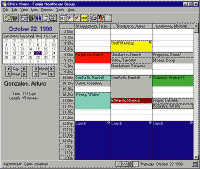
- Verify insurance eligibility before scheduled appointments.
- Collect co-payments and balances due at the time of check-in.
- Add payments directly into the MediSoft billing system from the
scheduling screen.
- Produce a “quick receipt” for payments collected up-front.
- Set up patients using the Patient Quick Entry feature, which
consolidates billing data entry into one easy screen.
- Submit claims electronically and manage claims by resubmitting
individual claims or batches of claims when there is a dispute with a
payor.
- Produce professional, easy to read patient statements.
- Automatically populate the Collections Worklist for follow-up with
payors and patients on unpaid claims.
Server or Single User
Office Hours Professional can be use as a stand-alone
version.
When purchased with MediSoft over a network, Office Hours
Professional for Networks, will use the same user licenses as MediSoft
Network Professional. I can be used as a standalone version when adding the
user licenses.
Scheduling
These features help to further streamline scheduling workflow.
- Print Blank Superbills—Users can now print blank superbills for
walk-in patients.
- Future Appointment Warning—If an appointment is entered or edited
for a patient who already has a future appointment scheduled, an
indicator message will warn the user of a prior scheduled appointment.
- Phone Numbers in Appointment Entry—Both the home and cell phone
numbers for patients are now shown in the Appointment Entry window.
- Blank Appointment Indicator — Users are now able to show or hide
blank appointments in the Office Hours Appointment List.
|
|
|
|
|
|
|
|
|